FieldRepOps

Latest release · November 11, 2026

What’s new in FieldRep Ops, and what it does for you.

Every update on this page traces back to a distributorship’s real week: a rep’s phone in the OR, an office closing the month, an owner reading a manufacturer’s statement. Here is what went into the product, the day it did, and what it means for yours.

17 updates since October 1  ·  each mark is a release day8 of the last 42 days
Oct 1Oct 15Nov 1Nov 11

November 2026

4 updates so far

11NovemberWednesdayRelease
Cases

Your most-used hospitals and surgeons come first.

On the case form, the hospitals and surgeons you work with most are listed first, ahead of the full list. On a delivery order, the Section you choose for an item is remembered the next time you add that item.

InventoryOn the phone

Photos on a tray after it is checked in.

Photos can be added to a tray after it has been checked in. Open the check-in, add the photos, and give each one its tray.
04NovemberWednesdayRelease
CasesOn the phone

Delivery order edits save themselves.

Every edit to a line on a delivery order, such as quantity, lot or serial number, is saved as you make it. If a phone puts the page away in the middle of a long entry, the work is there when you come back.

The company

A public status page.

Current uptime and the last thirty days of history are public at status.fieldrepops.com. No sign-in needed.

October 2026

13 updates · 6 release days

31OctoberSaturday
The company

Security and data handling, written out in full.

Where your records live, who can get in, how little patient information the product holds, and what we will never do with any of it. Read the security page.

28OctoberWednesdayRelease
InventoryOn the phone

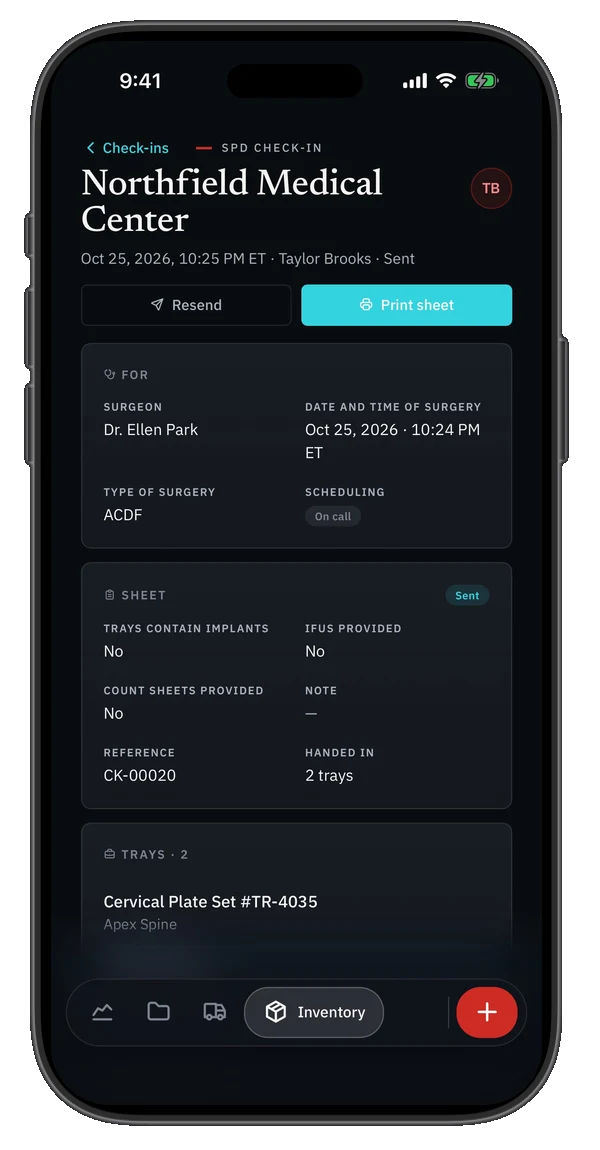
SPD check-ins from a phone.

Surgeon, case and trays are entered once, standing at the hospital. The check-in becomes a record of its own, not just a note of where each tray went.

  • The summary email links every tray to its record.
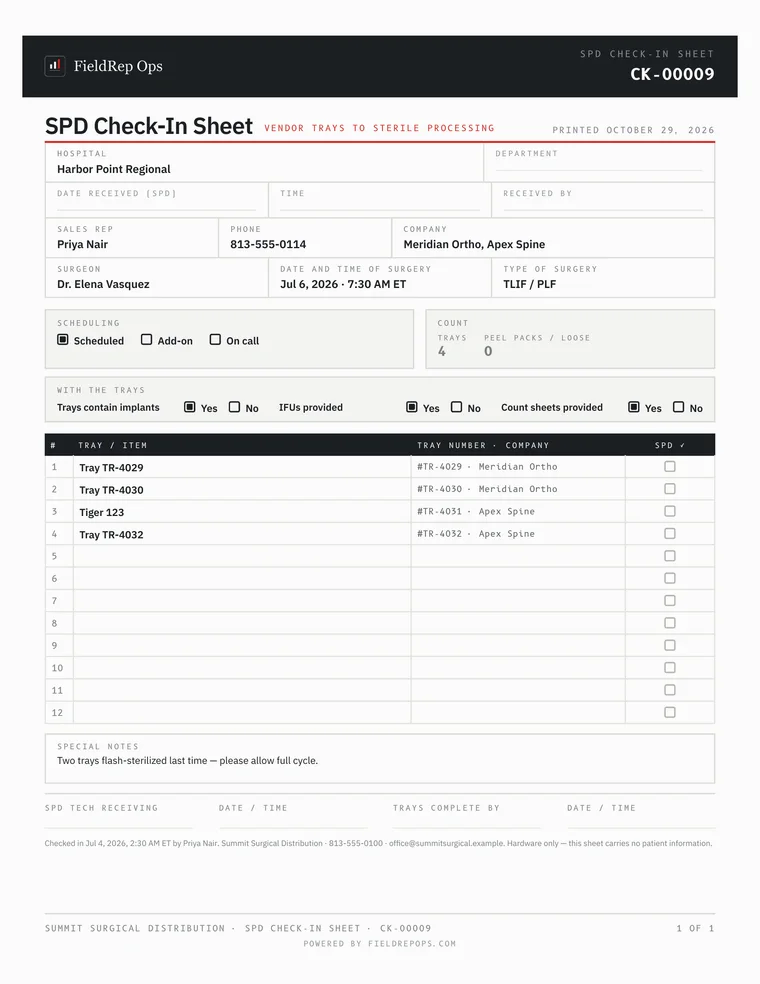
  • The SPD check-in sheet prints pre-filled from the same screen.
  • A past check-in can be looked up, corrected and sent again.

Sample data.

An SPD check-in on an iPhone: surgeon, date and time of surgery, two trays handed in, with Resend and Print sheet buttons. The printed SPD check-in sheet, pre-filled with the hospital, surgeon and trays.
Cases

Corrections to a signed delivery order.

A finalized delivery order can be corrected from the delivery order itself, without voiding it. What was corrected is kept on the record, and the nurse's signature stands.

Lot
A1123A1132
Reason
Mistyped at entry
Kept on the record
The old value, the new value, who made it and when
Nurse's signature
Stands
On the phone

Works on the folding iPhone, closed and open.

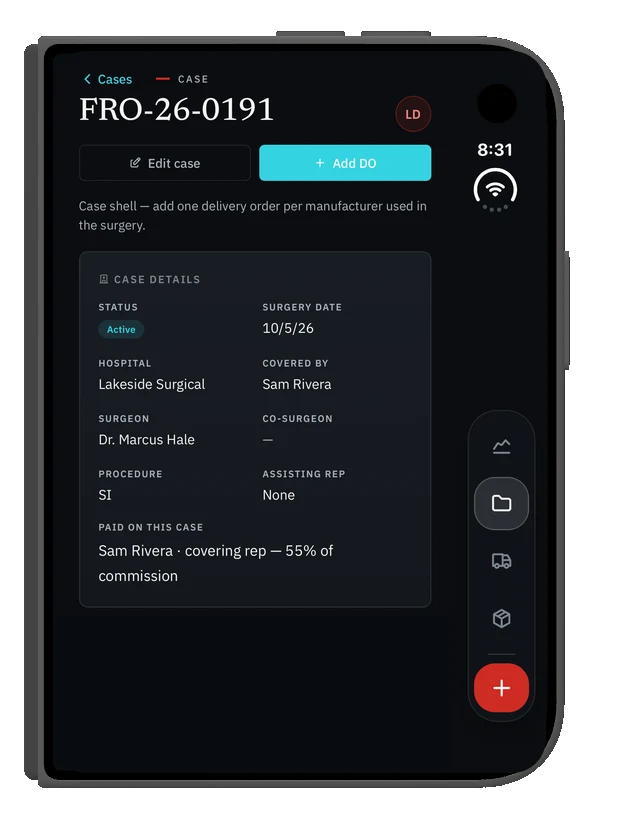
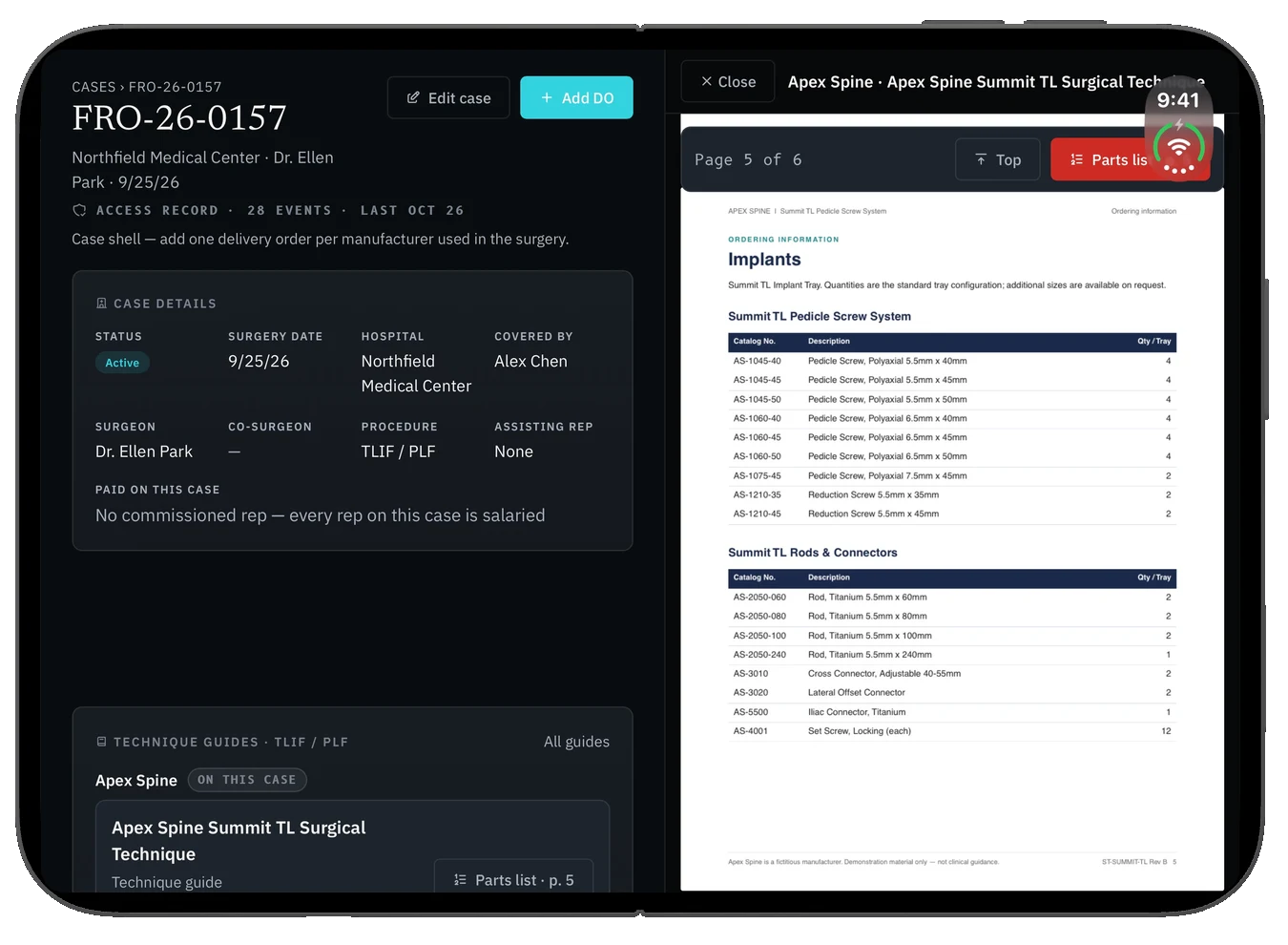
Closed, a case reads like it does on any phone, with the menu moved to the side where a thumb reaches it. Open, there is room for two things at once: the case on one side and the technique guide on the other. Nothing to install. It is the same address on every device.

Sample data.

The folding iPhone closed, showing a case with its details, the menu down the right-hand side. The folding iPhone open: a case on the left half, the manufacturer's technique guide open at its parts list on the right half.
MoneyCases

Hospital-owned items on a delivery order.

An item the hospital already owns can be marked on the line. It bills nothing, and a rep already paid on the hospital's earlier order is not paid twice.

Your team

Invites from Settings.

Each invite tells the new person the address, how to sign in with their work account, and how to put the app on a phone.

Money

Monthly overhead, a month at a time.

Overhead figures have a month view with totals, so the owners' profit-and-loss picture for a month sits on one screen.

19OctoberMonday
Your teamOn the phone

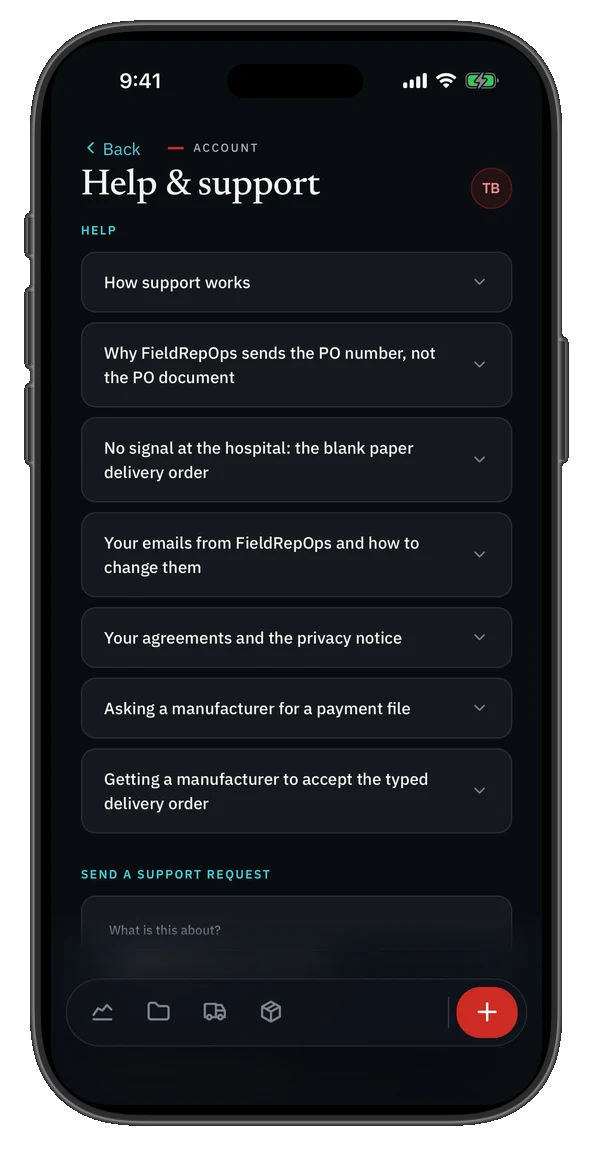
Help inside the app.

The common questions are answered where the work happens, in plain words. When the answer is not there, a support request goes from the same screen and can carry a screenshot.

The Help and support screen on an iPhone, listing common questions and a support request form.
13OctoberTuesday
Cases

Technique guides in the app.

Your own guides, opened at the parts list and offered on the delivery order for the systems on it.

07OctoberWednesday
Money

A reminder when the month is ready to close.

Owners who ask for it get an email when last month is ready to close, and again while anything is still waiting to be marked paid. The reminder never closes or pays anything. A person does.

01OctoberThursdayRelease
Money

Manufacturer statement disputes.

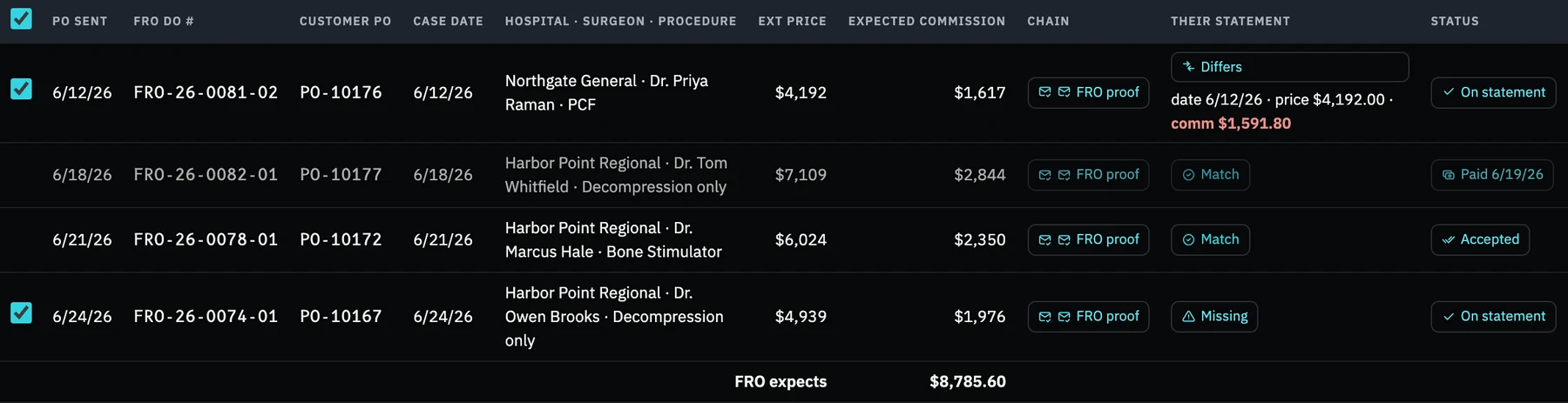
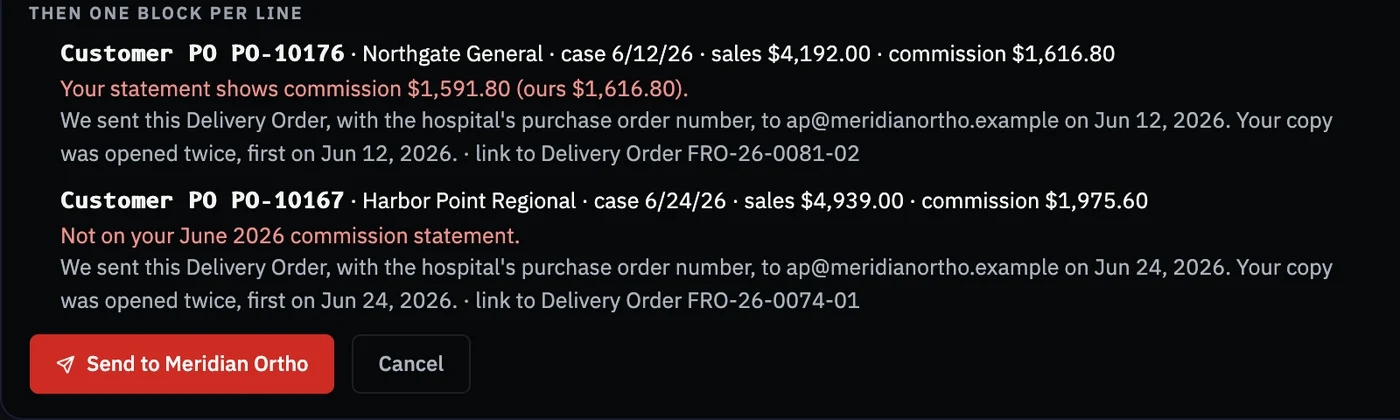
Load the manufacturer's statement and every line is compared with your own delivery orders: matched, differing, missing, unexpected, and the gap in dollars. Tick the lines that are wrong and the dispute email drafts itself.

  • Under each line: the purchase order number, what you expected, the day the delivery order was sent and the day it was opened.
  • Nothing attached, and no patient information.

Sample data.

Money › Manufacturer Statements
A manufacturer's statement compared line by line with the distributorship's delivery orders. One line differs on commission, one is missing from the statement.
The email it drafts
The drafted dispute email, one block per line: the purchase order, the hospital, the amounts, and when the delivery order was sent and opened.
Money

The month is closed by a person, and rep statements wait for it.

Leadership reviews the month and approves it. Rep statements go out after that approval, not before, so a rep never receives a number the owners have not seen.

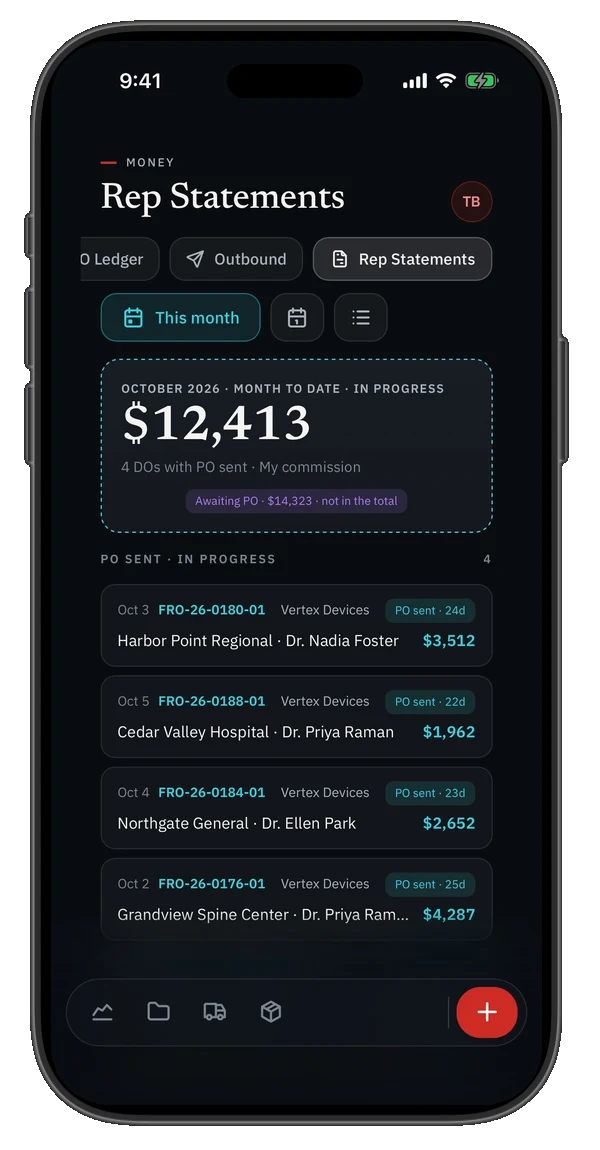
A rep's own statements, on a phone. Sample data.

A rep's statements on an iPhone: the month to date, and each delivery order with its commission.
Money

Several reps paid on one case.

Each rep on a case is paid on their own agreement, set by hospital, surgeon or manufacturer.

September 2026

Earlier

04SeptemberFriday
The company

Monitoring, with a person on call.

Uptime and security monitoring run around the clock, and a person is paged when something needs attention.

Where things stand

Already in place.

Insured.Cyber liability and technology errors-and-omissions coverage, plus general liability. Details.
Watched around the clock.Uptime and security monitoring, with a person on call who is paged when something needs attention.
Uptime in public.Current status and thirty days of history at status.fieldrepops.com.
An approved FedEx integrator.FedEx reviewed FieldRep Ops and approved it to connect to FedEx tracking directly. A replenishment shipment is followed from the delivery order to the door, then checked in against what that order said was coming. How shipments work.
Security written out in full.Where your records live, who can get in, and what we will never do. The security page.
Your own private environment.Each distributorship runs in its own private environment, and its people sign in through their own Google Workspace.

August 2026 · Where this record starts

In production.

FieldRep Ops begins running spine distributorship operations in production, handling real money end to end: signed delivery orders, purchase order follow-up, rep commission statements and tray inventory, from one record.

Want a say in what gets built next?

We are onboarding a small number of founding spine distributors: three months free, a say in what gets built, and a discounted flat monthly price you keep for as long as you stay.

Page updated November 6, 2026. Screens show sample data. Questions: access@fieldrepops.com. How your records are protected: the security page.

FieldRepOps
FieldRep Ops is the operating and financial system of record for independent spine distributorships
Customer sign-in access@fieldrepops.com Updates Answers Security Privacy policy