What it does · manufacturer statements
The manufacturer's statement, matched line by line.
On a spine case a single dropped biologic line is a four-figure commission. FieldRep Ops matches the manufacturer's commission statement to your delivery orders by the hospital's purchase order number, shows you what matches, what is missing and what differs, drafts the dispute with the proof of what you sent, and tracks each line until it is paid.
Import the statement as it comes
Manufacturers send their statements every way there is: a CSV, a spreadsheet, a PDF. The import reads a CSV; most manufacturers send one when asked, and a spreadsheet saves as one. You point at four columns, the customer PO, the case date, the extended price and the commission, and the system remembers that mapping for that manufacturer next month. A file whose PO numbers do not look like yours is refused rather than matched wrongly.
Matched by purchase order, never by month
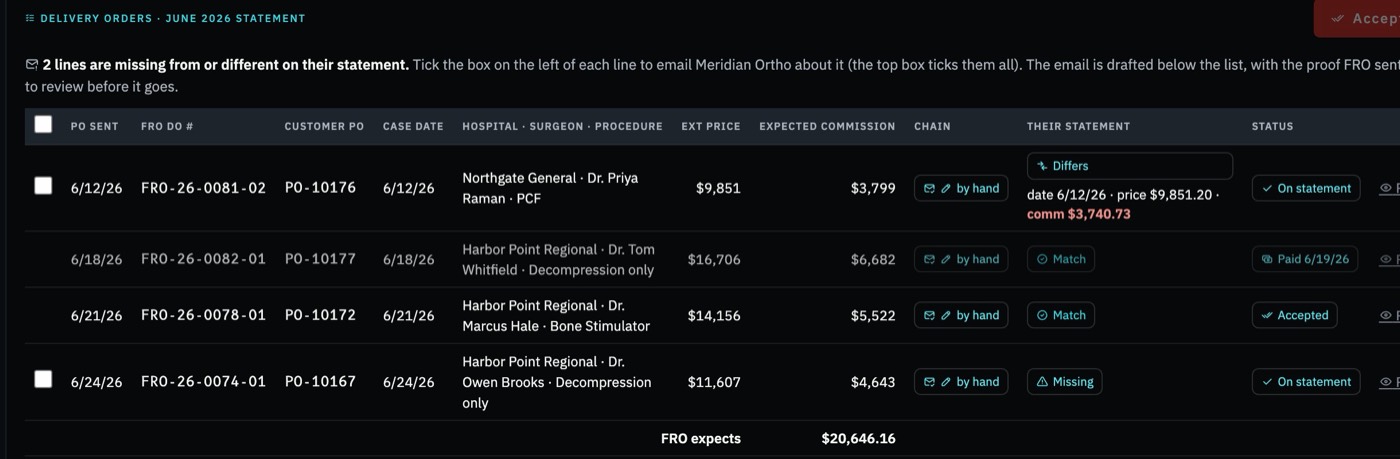
Each statement line is matched to the delivery order that carried that hospital PO. A line whose price and commission agree is a Match, even when their date is not yours; a manufacturer's date is usually the day the PO reached them, so it shows as a note, not a difference. A line on both sides with a different amount is Differs. An order of yours with no line on their statement is Missing. A line of theirs with no order of yours is Unexpected.
One manufacturer, one month: Match, Differs, Missing, and what has been paid. Sample data.
Accept what matches, dispute the rest
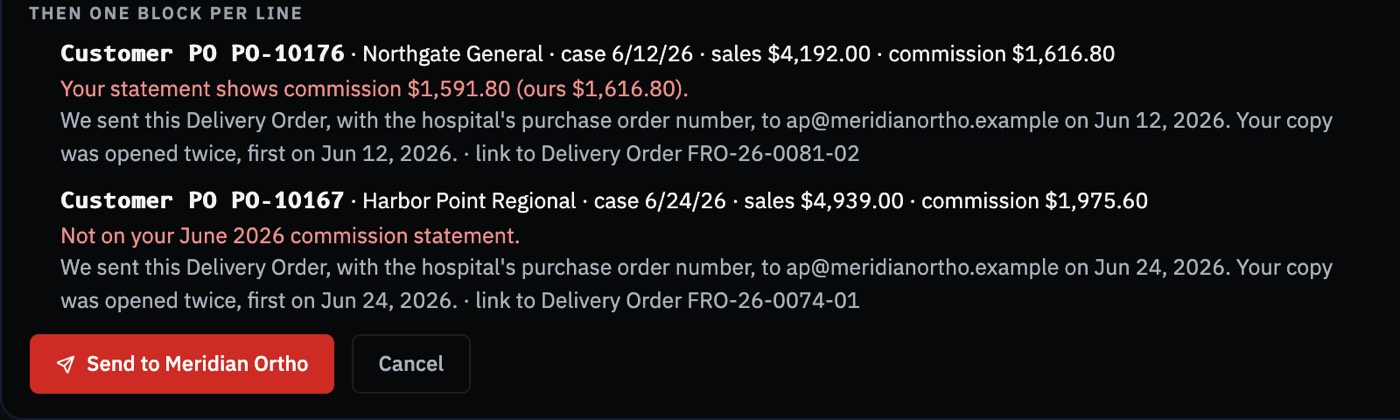
One click accepts every match. For each missing or differing line you tick the box, and the dispute email is drafted: one block per customer PO with the hospital, the case date, the price and commission you expected, what their statement shows, and the proof of what you sent, meaning who the delivery order went to, when, and when they opened it, with a secure link to the order. The order itself is never attached, because it carries the patient identifier. You read it and send it.
The dispute, drafted: one block per PO, with when the order was sent and when it was opened. Sample data.
Accepted is not paid
When the manufacturer's money lands, you mark the accepted lines paid and the date goes on each delivery order. Lines from earlier months that are still open carry forward, so a line accepted in June and unpaid in August is still in front of you.
What it does not do
It does not post anything to your books: the manufacturer's check is one entry in your accounting software, and the open lines stay here. Leadership only.
Straight answers
How does FieldRep Ops reconcile a manufacturer's commission statement?
Import the statement as a CSV, map four columns, and each line is matched to the delivery order that carried the same hospital PO number. Lines come back as Match, Differs, Missing or Unexpected.
Why match by PO number and not by month?
Because the manufacturer's month is the month the hospital's PO reached them, not the month of the surgery. Matching by PO removes the timing noise and leaves only the real differences.
What is in the dispute email?
One block per customer PO: the hospital, the case date, the price and commission expected, what their statement shows, when the delivery order was sent to them and when they opened it, and a secure link to the order. No attachment and no patient identifier.
What happens after a line is accepted?
It stays open until you mark it paid, and open lines from earlier months carry forward. Accepted is not paid; both dates are kept.
What it does, page by page
Each page describes one thing the system does for a spine distributorship, checked against the product as it runs today.
One signed record, for the whole spine distributorship
All of it keys off the delivery order signed at the case. From that one record come the send to procurement, the follow-ups, each rep's statement, the match against the manufacturer's statement, the tray check-in and the closed month. Nothing is retyped, so nothing drifts, and every total is reconciled back to the signed orders before every release and every week in production. It runs in a private environment that is your spine distributorship's alone; the security page says exactly what that means, in a form you can check.
Founding distributors
We are taking on a small number of founding spine distributors now, who use FieldRep Ops free while it proves itself on their books and know the price before they start. One private environment per distributorship; nothing shared with anyone.